
How to build your own online TV station with RTMP, Wowza, and MediaCP
Running your own TV station sounds complicated, but today it is not.
With the right setup, you can create a fully automated online TV channel, schedule content, and go live at any moment — all from a single control panel.
This is exactly what we provide with our RTMP server and MediaCP system.
What is an online TV station?
An online TV station is not just live streaming.
It is a system where:
-
You upload videos
-
Create playlists
-
Schedule content by time and day
-
Run 24/7 broadcasting automatically
And at any moment, you can interrupt everything and go live.
How the system works
The setup is simple.
You have:
-
RTMP server (Wowza-powered) → handles the streaming
-
MediaCP control panel → where you manage everything
This combination allows you to run a complete TV channel without technical complexity.
Step 1: Upload your content
You can upload your videos directly in MP4 format.
Once uploaded, they are available inside your Wowza Control panel File Manager, and ready to be used in playlists.
This is your content library.
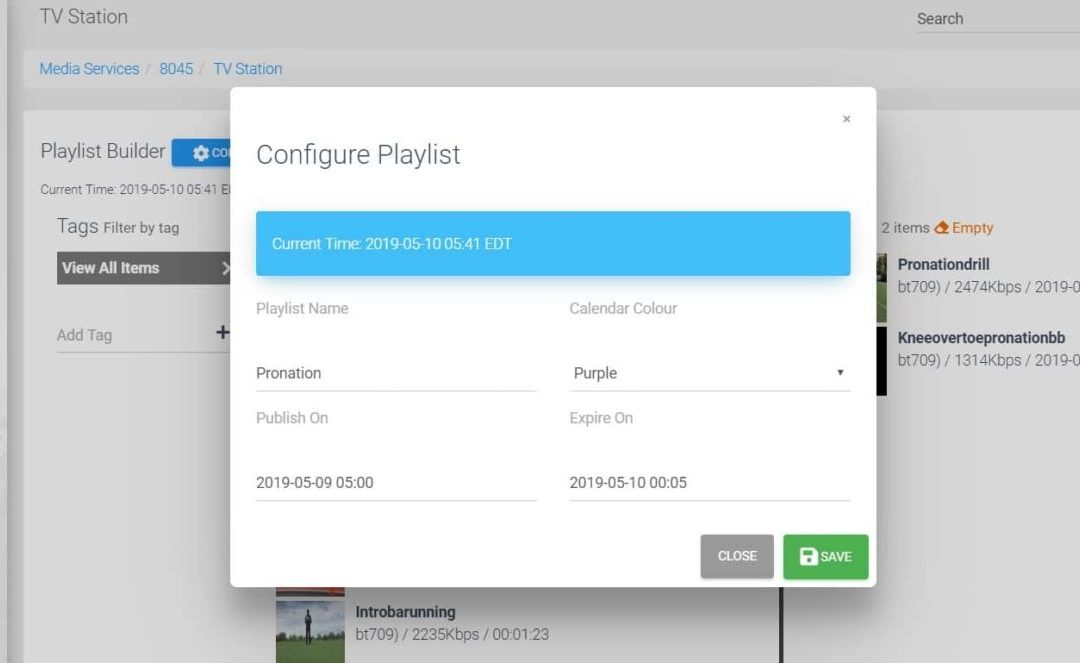
Step 2: Create playlists (your TV schedule)
This is where your TV station becomes powerful.
You can create multiple playlists, for example:
-
Playlist 1 → Monday morning
-
Playlist 2 → Afternoon programming
-
Playlist 3 → Evening shows
Each playlist can include:
-
Multiple videos
-
Specific order
-
Continuous playback
You are basically building your own TV programming grid.
Step 3: Schedule everything
Each playlist can be assigned to a specific time and day.
Example:
-
Monday 08:00 → Playlist A
-
Monday 14:00 → Playlist B
-
Monday 20:00 → Playlist C
Once configured, your TV station runs automatically.
No need to manually start streams.
Step 4: Go live anytime
At any moment, you can interrupt your scheduled content and start a live stream.
This is very important.
For example:
-
Breaking news
-
Live events
-
Interviews
You simply connect with OBS or StreamYard and go live.
When the live stream ends, the system continues with your scheduled playlists.
Step 5: Works on any package
This is important to understand.
The TV station feature works on all RTMP packages.
You do not need a special plan to start.
👉 You can choose any package here:
https://www.red5server.com/rtmp-server/#pricing
And use it as a full TV station.
Step 6: Try it for free
If you want to test it, you can start with a free demo account.
-
Select free trial
-
Choose service type: TV station
-
Test the full system for 5 days
This allows you to see exactly how it works before committing.
Why this setup works
Most people try to build a TV station using random tools.
It becomes complicated very quickly.
With RTMP + Wowza + MediaCP:
-
Everything is centralized
-
Everything is automated
-
Everything is scalable
You can start small and grow without changing your system.
Final thought
You don’t need a TV studio.
You need:
-
Content
-
A schedule
-
A reliable streaming system
Once you have that, your TV station is already running.